
Every delivery, straight to your door.
Share simple gate-to-door photo directions so delivery drivers skip locked gates, wrong buildings, and lost packages.
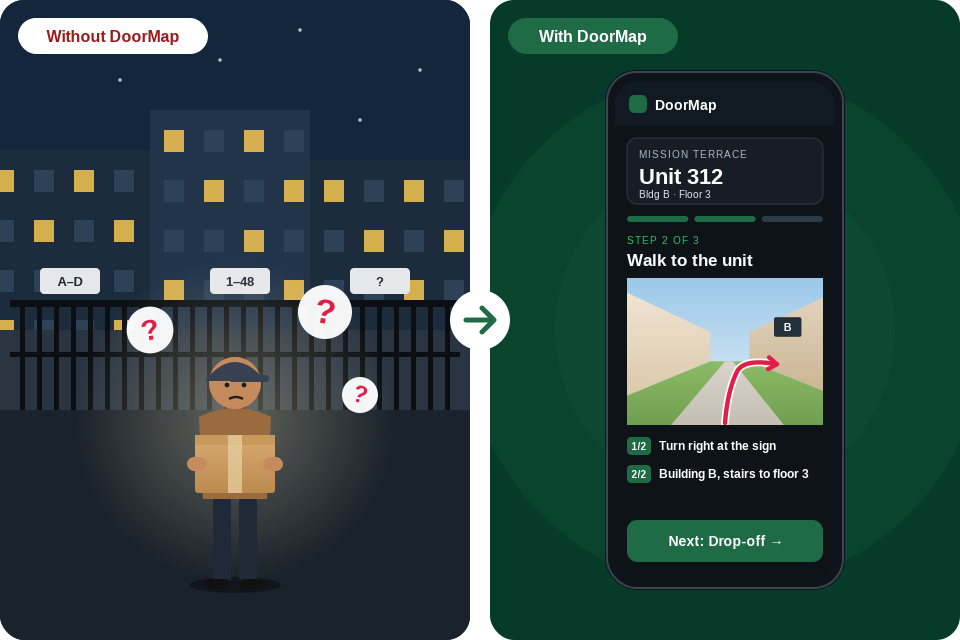
Set it up once. Every delivery finds your door.
About 3 minutes, from any phone.
- 1
Upload your apartment complex map
A photo of the map sign near your gate, or the map from your leasing office.
- 2
Identify your building and apartment door
Draw the path from the gate, circle your building, and add a photo of your door.
- 3
Share your DoorMap link or unit code
DoorMap gives your unit its own 6-character code. Add it, or your DoorMap link, to the delivery notes in your shopping apps.
- 4
Your delivery driver follows the directions to find you
Step-by-step photos lead them from the right gate to your door.
One complex, three ways in
Unit 312 has three gates. The closest one is locked, and a driver who's never been there has no way to know. The path you draw, and a photo of each turn, show them the way that works.
- 1Main gate on Folsom St. Use this one. Walk straight in along the main path, with the pool on your right. At the end of the pool, turn right. Building B's door is ahead on your left, under the BLDG B sign.
- 2Walk-in gate on 22nd St. Closest to Building B, but closed: the gate is locked.
- 3Garage gate on the alley. Through the parking lot.
Make Every Delivery Easier.
Help your delivery driver find the right gate, building, and apartment door without getting lost.
Help your driver find you.
Upload your apartment map, show the way to your door, and optionally protect your map with a password.
Your privacy matters
Choose whether your map is publicly accessible or password-protected.
Questions
Is DoorMap free?
Yes, for residents and drivers. Drivers can look up homes without an account, up to a daily limit; a free account allows up to 100 a day.
Do drivers need to install an app?
No. DoorMap works in any phone browser. Drivers enter the unit code DoorMap gave the home, or the address.
Who can see my map and photos?
Anyone with your unit code or exact address and unit, unless you add a password. Your email and phone are never shown.
Don't have an apartment map?
Simply take a screenshot of an online map or of your leasing office's website, upload it to DoorMap, and mark the route to your door. Add a few photos to make finding your apartment even easier. Keep the map's copyright line in the screenshot.
How do I mark the route to my apartment?
Use DoorMap's built-in drawing tool to draw a line showing the route from the entrance gate to your building and apartment. We recommend using red so delivery drivers can easily see and follow your route.
Built by a driver, for the community.
DoorMap was born from firsthand delivery experience—not a corporate boardroom. Having navigated confusing gates, unmarked buildings, and countless hard-to-find doorsteps, I understand the stress and frustration of the final stretch of a delivery.
I believe we are here to make a positive impact and make the world a better place by whatever means we can. DoorMap is my way of putting that belief into action: helping drivers find their destinations with less confusion and stress, while making life easier for residents.
By sharing a simple photo of your entrance or doorstep, you can help someone save time, feel less frustrated, and get to their next delivery a little sooner. Together, we can turn a small act of kindness into a better experience for everyone.
Find the right door, fast.
Enter the DoorMap unit code from the delivery notes, or the address, then follow photo directions from the gate to the door. No app needed.
Three steps to the right door.
- 1
Enter the unit code
Type the 6-character code DoorMap gave the home (it’s in the delivery notes), or search by address and unit.
- 2
Follow the photos
One step at a time: the right gate, the path on the map, the building, the door.
- 3
Deliver to the exact spot
A photo shows exactly where to leave the package. Tap Delivered and you're done.
Free driver account
- Higher daily limit: look up to 100 homes a day, instead of the smaller limit without an account.
- Personalized settings: dark or light screen, bigger photo instructions, and a screen that stays on while you walk.
- Your recent homes: recently viewed homes on all your devices.
- Simple sign-in: your email and password.
Questions from drivers
Do I need an account?
No. You can look up homes without one, up to a daily limit. A free driver account raises it to 100 homes a day.
Do I need to install an app?
No. DoorMap works in any phone browser.
Where do I find the unit code?
DoorMap gives every registered unit its own 6-character code, and residents add it to their delivery notes. You can also search by address and unit.
Some maps ask for a password. Why?
Residents can protect their map. Ask the resident or check the delivery notes for the password.
Questions? Email drivers@doormap.app.
Built by a driver, for the community.
DoorMap was born from firsthand delivery experience—not a corporate boardroom. Having navigated confusing gates, unmarked buildings, and countless hard-to-find doorsteps, I understand the stress and frustration of the final stretch of a delivery.
I believe we are here to make a positive impact and make the world a better place by whatever means we can. DoorMap is my way of putting that belief into action: helping drivers find their destinations with less confusion and stress, while making life easier for residents.
By sharing a simple photo of your entrance or doorstep, you can help someone save time, feel less frustrated, and get to their next delivery a little sooner. Together, we can turn a small act of kindness into a better experience for everyone.
Get in touch: all contact addresses.
Fewer lost packages at your community.
- 100% Free — No Subscriptions
- Zero Resident Data Required
- 2-Minute Setup + Resident Flyer
Help couriers find every gate, building and door. Fewer wrongly placed packages means less hassle for you and your office. DoorMap is free for your residents.
Three easy ways to help.
- 1
Tell your residents
Mention DoorMap in your welcome packet, newsletter or resident portal. Residents register at doormap.app in about 3 minutes.
- 2
Share your site map
Give residents a clear copy of your community map. They upload it and draw the path from the right gate to their door.
- 3
Tell us what would help
Interested in a version for property managers? Tell us about your community and what you need.
“Great communities run on smooth, accessible access. Having navigated complex properties firsthand, I saw how small gaps in last-meter directions lead to delivery delays, frustrated residents, and unnecessary calls to leasing offices. At doormap.app, our goal is simple: build reliable, easy-to-use navigation that respects everyone’s time—whether you’re delivering a package, visiting family, or managing the property.”
Already set up with us? Sign in to see your property’s totals in My account.
Talk to us
Tell us your needs: we can customize a dashboard for you.
Prefer email? Write to b2b@doormap.app
Find a unit
Recently viewed
Viewing or using DoorMap directions is subject to our Terms of Service and Privacy Policy. Without an account, we keep a random guest ID and a one-way hash of browser details only to apply the free daily limit; both are deleted after 90 days without use.
Loading directions…
Directions not found
Search againThis apartment map is password-protected
Enter the password the resident shared with you. It's usually in the delivery notes, next to the unit code.
Unit code · Search for another home
Viewing or using DoorMap directions is subject to our Terms of Service and Privacy Policy.
Delivered
Thanks. Your answer helps us improve DoorMap.
Only you can see it, in My account, under this address. Don’t photograph people, package labels or inside homes.
Saved. Find it in My account.
Want to save photos of tricky addresses for next time? Get a free driver account.
Viewing or using DoorMap directions is subject to our Terms of Service and Privacy Policy.
Voice is off in your settings. Turn it on
Viewing or using DoorMap directions is subject to our Terms of Service and Privacy Policy.
Register your home
Takes about 3 minutes. Add your complex map and draw the path from the gate to your door, then add photos of the entrance and where to leave packages. You can keep it public or protect it with a password. No need to finish in one go: your progress is saved in your own browser on this device, so you can come back and finish later.
Check your email
We sent an activation link to . Open it to activate your account and create your password.
Open the link on this device, in this browser. For your security, it only works where you asked for it.
Can't find it? Check your spam or promotions folder.
Activate within 72 hours. We'll send you a reminder each day until then. If you don't, the registration and its photos are deleted.
Checking your link…
This link doesn't work
Activation links work for 72 hours and only once. If your registration was deleted, you can register again. If you already activated, sign in.
Create a password
For . You'll use it to sign in and change your information.
Sign in
Sign in with your email and password.
Your 6-character DoorMap unit code is for drivers only. It opens your home's directions; it doesn't sign you in.
New here? Register your home or create a driver account.
Activating…
This link doesn't work
Activation links work once, and only in the browser where you registered or asked for the link. You can get a new activation link. If your registration was deleted after 72 hours, you can register again.
Create your password
You'll use your email and this password to sign in.
Your properties
Last 30 days. Totals under 3 show as “fewer than 3”. We never show residents, units, contact details or gate codes.
DoorMap assigned this unit code to your home. Share it or the link with drivers.
Get a new unit code? Your current unit code stops working right away and drivers who opened your map lose access. Update the unit code in your delivery notes afterwards.
Who opened your directions
When and how your directions were opened. We don't record who the driver was.
Protect My Apartment Map
Add a password to control who can view your apartment map. Free for everyone.
Changing your password, removing it, or turning off your link immediately stops access for every driver who opened your map before.
Photos suggested by drivers
Drivers who delivered to you suggested these. Nothing changes unless you approve. We never share who sent them, and suggestions you don’t review are deleted after 30 days.
What drivers see
Change your information
My account
My saved photos
Photos you saved after deliveries, by address. Only you can see them. You can suggest one to the resident: they get a copy without your name or contact details, and your own photo stays here.
No saved photos yet. After a delivery, use “Save a photo for next time”.
Usage and history
Recently viewed
Signed-in devices
You can stay signed in on up to 5 of your own devices. If your account is used in two places at once, we sign out the other devices to keep it private.
Settings
Signed in as
How you sign inWith your email and password.
Need help? Email support@doormap.app. Ideas to improve DoorMap? Send feedback.
Delete your account permanently? Your unit code stops working and all your photos and information are deleted. This can't be undone.
Create a driver account
Free. Lets you choose what you see on each delivery. No password needed: we email you a code to sign in.
- ✓ Dark or light screen, and bigger photo instructions
- ✓ Screen stays on while you walk
- ✓ Look up to 100 homes a day
- ✓ Recently viewed homes on all your devices
Feedback & support
Tell us what works, what doesn't, or what you'd like DoorMap to do next.
Thanks for your feedback. If you left your email, we'll reply there.
- Residents (registering, editing your home, maps and photos)residents@doormap.app
- Drivers (looking up homes, driver accounts)drivers@doormap.app
- Property managers and businessb2b@doormap.app
- Ideas to improve DoorMapfeedback@doormap.app
- A wrong or unclear photo or pathreports@doormap.app
- Privacy requestsprivacy@doormap.app
- Anything else, or account and sign-in problemssupport@doormap.app
For account problems, write from the email address you registered with. We usually reply within 2 business days.
Inbox
Loading…
Frequently asked questions
Is DoorMap free?
Yes. It's free for drivers and for residents.
Do drivers need an account?
No. You can look up homes without one, up to a daily limit. Enter the address or the home's 6-character DoorMap unit code on Find a unit.
Why should drivers create a free driver account?
It's free and takes about a minute. Your account lets you choose what you see on each delivery:
- Dark or light screen, easier on your eyes at night
- Bigger photo instructions you can read at a glance
- Screen stays on while you walk, so you don't have to unlock your phone
- Up to 100 homes a day
- Recently viewed homes saved on your phone and computer
Why am I asked to sign up?
Without an account, DoorMap has a daily limit. When you reach it, sign up for free to look up to 100 homes a day, keep your recently viewed homes, and use DoorMap on your phone and computer. Each driver needs their own account; shared guest access or shared accounts are blocked to keep DoorMap free for everyone.
What is the 6-character unit code?
DoorMap assigns every registered unit its own code, like A7K3QZ. It’s an ID, not a password, and only the resident and the drivers they share it with know it. Residents add it to the delivery notes in their shopping apps. Drivers type it in to see the photo directions. Capital letters are added automatically.
Why should I draw a path on my complex map?
It's the most important part. Many complexes have several gates, and drivers can't tell which one leads to your door. Your drawn path shows them the way in.
Don't have an apartment map?
Simply take a screenshot from Google Maps or OpenStreetMap, upload it to DoorMap, and mark the route to your door. Add a few photos to make finding your apartment even easier. Keep the map's copyright line in the screenshot.
How do I mark the route to my apartment?
Use DoorMap's built-in drawing tool to draw a line showing the route from the entrance gate to your building and apartment. We recommend using red so delivery drivers can easily see and follow your route.
Can I password-protect my apartment map?
Yes, for free. When you register, or later in My account, choose Password-protected and set a password. Drivers must enter it before they see anything. You can change it, remove it, or turn off your link at any time. Each change stops access for drivers who opened your map before.
Who can see my photos and information?
Anyone with your unit code or address can see your address, unit, photos and delivery instructions. Your email, phone number and password stay private. Drivers never see them.
What happens if I don't activate within 72 hours?
Your registration and its photos are deleted. You can register again at any time.
Why does my activation link say to use the same browser?
For your security, the activation link only works in the browser where you registered or asked for it. Even if someone else saw the email, they couldn't use the link on their own device.
- If you registered on your laptop and opened the email on your phone: open the link on your laptop instead.
- If you'd rather finish on your phone: go to get a new activation link on your phone.
- Private or incognito windows: stay in the same window until you've activated. Closing it forgets that you asked for the link.
Activation must happen within 72 hours.
How do I sign in?
With your email and password. You create your password when you activate your account. Forgot it? Tap Forgot your password? on the sign-in page and we'll email you a link to choose a new one. Your 6-character DoorMap unit code is only for drivers: it opens your home's directions and never signs anyone in.
How do I change or delete my information?
Sign in and open My account. You can edit everything, turn off updates and ads, or delete your account.
A photo or path is wrong. What should I do?
On the directions page, tap Report this photo under the photo, or Report a problem with these directions. We review every report.
How do I contact DoorMap?
Residents: residents@doormap.app. Drivers: drivers@doormap.app. Property managers: b2b@doormap.app. Ideas: the feedback form or feedback@doormap.app. Privacy: privacy@doormap.app. Anything else: support@doormap.app. All addresses
Terms of Service
Effective Date: November 19, 2026 · Last Updated: November 27, 2026
Welcome to DoorMap ("Company," "we," "us," or "our"). These Terms of Service govern your access to and use of https://doormap.app, including our website, apartment navigation tools, map uploads, resident accounts, and related services (collectively, the "Service").
By accessing or using our Service, you agree to these Terms. If you do not agree, please do not use the Service.
1. About Our Service
Our platform helps residents provide apartment complex maps, property layouts, building information, and navigation details to help delivery drivers and other authorized visitors locate the correct entrance, building, and apartment door.
Our services may include:
- Apartment complex map uploads.
- Apartment and unit identification codes.
- Building and entrance navigation.
- Map sharing and access links.
- Optional password protection.
- Resident accounts and related features.
- Additional services introduced in the future.
We may update, improve, modify, suspend, or discontinue features as necessary, subject to applicable law.
2. Eligibility and Accounts
You must provide accurate information when creating an account.
You are responsible for:
- Maintaining the confidentiality of your account credentials.
- Protecting your passwords and access codes.
- All activities conducted through your account, to the extent legally attributable to you.
- Notifying us if you suspect unauthorized access.
You may not impersonate another person, create fraudulent accounts, or use another person's account without authorization.
We reserve the right to suspend or restrict accounts involved in fraud, abuse, security violations, or violations of these Terms, subject to applicable law.
3. Resident-Uploaded Content
Residents may upload apartment maps, property layouts, images, building details, and other navigation information.
You represent and agree that:
- You have the legal right or authorization to upload the information.
- Your uploads do not knowingly violate another person's privacy, intellectual property rights, or other legal rights.
- You will not upload illegal, harmful, misleading, or unauthorized content.
- You will not upload images containing sensitive personal information that is unnecessary for navigation.
- You will avoid including information about other residents without their permission.
You retain ownership of content you upload.
You grant us a limited, non-exclusive, worldwide license to host, store, process, display, reproduce, and transmit your content solely as reasonably necessary to operate, maintain, secure, and provide the Service, including sharing it according to your privacy and access settings.
We do not acquire ownership of your apartment maps or photographs through this license.
Complex Maps and User-Submitted Content
When you upload a general apartment complex layout or property site map ("Base Complex Map"), you acknowledge that general building layouts are non-confidential reference information. You grant DoorMap a worldwide, royalty-free license to host, display, resize, and make that Base Complex Map available as a starting template for other residents and delivery drivers at the same property.
Your unit-specific route drawings, door and entrance photos, delivery instructions, and gate codes ("Unit Directions") are displayed only according to the privacy and password settings you select, and are never shared as templates with other residents. You confirm that any map or photo you upload does not infringe third-party copyrights or disclose restricted security plans.
Photo location and other photo details
Photos often contain hidden details (metadata), such as the location where the photo was taken, the date and time, and the camera or phone model.
- Location: when you upload a photo, we read the GPS coordinates stored in the photo, if there are any, and keep them with that photo. You can also choose to save a photo's location with your phone's location, read once at that moment. We use these coordinates to place the photo on your map and to help drivers find your door.
- All other details are removed: we remove all other photo metadata that isn't needed, such as the date and time, camera and phone model, software, and comments. We keep only what is needed to show the picture correctly, such as its color profile and which way is up.
- What drivers see: photos shown to drivers contain no hidden details at all. Drivers can see a photo's location only as a pin on your home's map.
- Your choice: you can remove a saved photo location at any time in My account, and it is deleted with the photo or your account.
4. Apartment Information and Navigation Accuracy
Our Service is designed to assist with navigation. We do not guarantee that every uploaded map, building layout, entrance, unit number, or navigation instruction is accurate, complete, or current.
Apartment complexes may change their entrances, parking arrangements, building numbers, access restrictions, and layouts.
Residents are responsible for reviewing and updating information they provide.
Drivers and other users should follow posted signs, property rules, lawful instructions, and emergency directions.
Our navigation service is not an emergency service and must not be relied upon for emergency response, evacuation, or other safety-critical situations.
5. Password Protection and Access Control
We may provide residents with optional password protection for their apartment maps.
Residents are responsible for choosing secure passwords and sharing them only with people they authorize.
Password protection is an access-control feature and does not guarantee that unauthorized access is impossible.
We will use reasonable technical and organizational safeguards to protect restricted information.
We may temporarily restrict access to maps or accounts when reasonably necessary to investigate security incidents, prevent abuse, or comply with legal obligations.
6. Unit Identification Codes
Our platform may automatically generate unique identification codes for apartment units or maps.
These codes are intended to identify records within our platform. They are not passwords, authentication credentials, or proof of identity unless we expressly designate them for an additional purpose.
Users must not attempt to guess, enumerate, manipulate, or exploit identification codes to access information belonging to others.
7. Acceptable Use
You agree not to:
- Access another person's private apartment information without authorization.
- Attempt to bypass passwords or access controls.
- Scrape, copy, harvest, or systematically collect information from the platform without permission.
- Reverse engineer, disrupt, damage, or interfere with the Service.
- Upload malware or malicious files.
- Harass, threaten, stalk, or intimidate residents, drivers, or other users.
- Use the Service for unlawful surveillance or other unlawful activities.
- Misrepresent your identity or authorization.
- Use the platform to facilitate illegal activities.
We may investigate suspected violations and take appropriate action, including removing content, restricting accounts, or reporting unlawful conduct where appropriate.
8. Privacy and Personal Information
Your use of the Service is also governed by our Privacy Policy.
We may collect and process information necessary to provide our services, including account information, apartment navigation information, uploaded content, device information, and technical usage information.
We will handle personal information according to our Privacy Policy and applicable privacy laws.
You may have rights to access, correct, delete, or obtain information about your personal data, depending on applicable law.
9. Third-Party Services
Our platform may rely on third-party providers for hosting, storage, authentication, analytics, mapping, email delivery, and other technical services.
We are not responsible for independent third-party services, websites, or policies that we do not control.
Your use of third-party services may also be governed by their own terms and privacy policies.
10. Service Availability
We aim to maintain reliable access to the Service but do not guarantee uninterrupted availability.
We may experience maintenance, outages, technical problems, security incidents, or service interruptions.
To the extent permitted by law, we are not responsible for interruptions caused by circumstances beyond our reasonable control.
11. Disclaimer of Warranties
TO THE MAXIMUM EXTENT PERMITTED BY APPLICABLE LAW, THE SERVICE IS PROVIDED "AS IS" AND "AS AVAILABLE."
WE DISCLAIM WARRANTIES THAT MAY LAWFULLY BE DISCLAIMED, INCLUDING IMPLIED WARRANTIES OF MERCHANTABILITY, FITNESS FOR A PARTICULAR PURPOSE, AND NON-INFRINGEMENT.
WE DO NOT GUARANTEE THAT THE SERVICE WILL ALWAYS BE AVAILABLE, ERROR-FREE, SECURE, OR THAT NAVIGATION INFORMATION WILL ALWAYS BE ACCURATE.
Nothing in these Terms excludes warranties or rights that cannot legally be excluded.
12. Limitation of Liability
TO THE MAXIMUM EXTENT PERMITTED BY APPLICABLE LAW, THE COMPANY AND ITS OWNERS, EMPLOYEES, AFFILIATES, AND SERVICE PROVIDERS WILL NOT BE LIABLE FOR INDIRECT, INCIDENTAL, SPECIAL, CONSEQUENTIAL, EXEMPLARY, OR PUNITIVE DAMAGES ARISING FROM OR RELATED TO USE OF THE SERVICE.
TO THE MAXIMUM EXTENT PERMITTED BY LAW, OUR TOTAL LIABILITY FOR CLAIMS ARISING FROM THE SERVICE WILL NOT EXCEED THE GREATER OF:
(a) THE AMOUNT YOU PAID US FOR THE SERVICE DURING THE 12 MONTHS BEFORE THE EVENT GIVING RISE TO THE CLAIM; OR
(b) ONE HUNDRED U.S. DOLLARS ($100).
These limitations do not apply where prohibited by law, including liability that cannot legally be limited or excluded.
13. Indemnification
To the extent permitted by applicable law, you agree to indemnify and hold harmless the Company and its personnel against third-party claims, damages, and reasonable legal expenses arising directly from your unlawful conduct, your unauthorized uploads, or your material violation of these Terms.
This provision does not require you to indemnify us for our own negligence, misconduct, or legal violations where prohibited by law.
14. Suspension and Termination
You may stop using the Service at any time.
You may request account deletion through your account settings or by contacting us.
We may suspend or terminate access when reasonably necessary for security, fraud prevention, legal compliance, or material violations of these Terms.
Where appropriate and legally permitted, we will provide notice and an opportunity to address the issue.
Termination does not eliminate legal obligations or rights that arose before termination.
15. Changes to These Terms
We may update these Terms to reflect changes in our services, business operations, security practices, or legal requirements.
We will post the updated Terms and revise the Last Updated date.
Where legally required, we will provide additional notice or obtain consent before changes take effect.
16. Governing Law
These Terms are governed by the laws of the State of California, without regard to conflict-of-law principles, except where applicable law requires otherwise.
Nothing in these Terms takes away consumer rights or protections that cannot legally be waived under the laws applicable to you.
17. Contact Information
For questions, complaints, or legal notices concerning these Terms, contact:
- Company
- DoorMap
- Website
- https://doormap.app
- support@doormap.app
By using our Service, you acknowledge that you have read and understood these Terms of Service.
Privacy Policy
Effective Date: November 19, 2026 · Last Updated: November 27, 2026
At DoorMap ("Company," "we," "us," or "our"), we respect your privacy and are committed to protecting your personal information.
This Privacy Policy explains what information we collect, how we use it, how we protect it, when we disclose it, and what choices and rights you may have when using https://doormap.app and our related services.
This policy applies to residents, visitors, delivery drivers, registered users, and other individuals who interact with our Service.
Notice at Collection
This summary is shown wherever we collect personal information. Details are in the sections below.
| What we collect | Why | Sold or shared? | How long |
|---|---|---|---|
| Email, optional phone, password (hashed), marketing choice | Account, sign-in, service emails, marketing only if you opt in | No | Until you delete your account |
| Home address, unit, photos, maps, the path you draw, instructions, optional map password (hashed), photo locations (from the photo's own details, or read once from your phone if you choose) | Showing drivers the way to your door | No. Shown to people with your code or password | Until you delete it or your account |
| Guest ID, browser fingerprint hash, hashed network prefix, device and country | Free-usage limits, fraud prevention, account security | No | 90 days of inactivity, or 30 days for sessions |
| Reports, feedback, privacy requests, optional email | Fixing problems, replying to you, legal records | No | Up to 5 years |
1. Information We Collect
Depending on how you use our platform, we may collect the following categories of information.
A. Account Information
- Email address.
- Phone number, if you choose to give it.
- Your password (stored only as a secure one-way hash, never in readable form).
- Activation and password-reset links we email you (stored only as a secure one-way hash, and deleted once used or expired).
- Account preferences, such as driver display settings (dark screen, larger text, keep the screen on).
- Your choices about marketing emails and the version of the Terms of Service you accepted, with dates.
- Account creation and activity information, such as when you activated your account.
B. Apartment and Navigation Information
To provide apartment navigation services, we may collect:
- Apartment complex names.
- Property addresses and ZIP codes.
- Building numbers and identifiers.
- Floor and apartment or unit numbers.
- Entrance gate information.
- Apartment maps and property layouts, including paths you draw on them.
- Uploaded photographs and images.
- Where a photo was taken: the GPS coordinates stored in the photo itself, if any; a spot you tap on your map; and/or your phone's location, read once at that moment if you choose. We keep only the coordinates and remove all other photo metadata. We never track your location or read it in the background.
- Navigation and delivery instructions.
- Unique unit identification codes.
- If you turn on password protection: your map password, stored only as a secure hash.
Apartment and unit-level information may reveal a person's residential location. We treat this information with appropriate care and access restrictions.
C. Uploaded Content
We collect the images and maps residents voluntarily submit. Photos contain hidden details (metadata). If a photo contains GPS coordinates, we read and keep them with that photo; we remove all other metadata that isn't needed (such as date and time, camera and phone model, software and comments), keeping only what is needed to show the picture correctly. Drivers see resized copies with no metadata at all. We also keep a full-size original of each photo privately, with that metadata removed, so we can make better copies later; originals are never shown to anyone.
We also collect problem reports and feedback messages you send us, and an email address if you include one so we can reply.
Drivers with an account can save their own photos after a delivery, with an optional short note, tagged to that delivery address. These photos are private: only the driver who saved them can see them. We remove all hidden details (including location) from these photos before storing them. If a driver chooses to suggest one of their photos to the resident, the resident receives a copy of the photo and its note, never the driver’s name, email or phone number; the photo is only added to the resident’s directions if the resident approves it.
Please avoid uploading photographs containing unnecessary personal information, security credentials, access codes, faces, license plates, or information belonging to other residents.
D. Device and Technical Information
We automatically collect certain technical information:
- IP address: our hosting provider receives it to deliver the website. We store only a one-way hash of part of it (the network prefix), used for usage limits and abuse prevention.
- Browser type, device type and operating system (from your browser), shown in your list of signed-in devices.
- Country (from your network), for your signed-in devices list and account security.
- A browser fingerprint: a one-way hash of details such as screen size, language, time zone and graphics settings. It is used only for free-usage limits, fraud prevention and account security.
- General usage information: which homes you looked up, how many per day, and your recently viewed homes.
- Login timestamps and the last time each signed-in device was used.
- Error reports and request logs, kept by our hosting provider.
- Security and fraud-prevention logs, such as failed map-password attempts.
E. Cookies and Similar Technologies
We use only cookies and browser storage that are necessary to provide the Service and keep it secure. We do not use advertising, analytics or third-party cookies.
| Name | Type | Purpose | How long |
|---|---|---|---|
| dm_session | Cookie | Keeps you signed in and maintains your account session | Up to 30 days |
| dm_guest | Cookie and browser storage | Your random guest ID, so free-usage limits work without an account | 1 year (guest record deleted after 90 days of inactivity) |
| dm_fp | Browser storage (session) | Browser fingerprint hash, for usage limits and fraud prevention | Until you close the tab |
| dm_access_… | Browser storage (session) | Your pass for a password-protected map | Until you close the tab; the pass expires after 12 hours |
| Form drafts | Browser storage (session) | Remembers activation links in development mode only | Until you close the tab |
Because we only use strictly necessary cookies, there are no optional cookies to turn on or off. If we ever add non-essential cookies or tracking technologies, we will ask for your consent first where required.
2. How We Use Your Information
We use information for legitimate business and service purposes, including:
- Creating and managing user accounts.
- Providing apartment navigation services.
- Generating and managing apartment identification codes.
- Displaying authorized apartment maps.
- Enabling residents to share navigation information.
- Providing password protection and access control.
- Enforcing free-usage limits and preventing shared or abusive use.
- Maintaining platform security.
- Detecting fraud and misuse.
- Troubleshooting technical problems.
- Improving our services and user experience.
- Responding to customer support requests and problem reports.
- Sending important service notifications, such as activation emails, activation reminders and password-reset emails.
- Sending marketing emails, only if you opted in.
- Complying with legal obligations.
We will not use personal information for unrelated purposes in a manner inconsistent with applicable law.
3. Apartment Maps and Residential Privacy
We recognize that apartment maps and unit-level navigation information may reveal sensitive details about where people live.
We therefore aim to:
- Limit access to apartment maps according to resident-selected settings.
- Make maps reachable only with the home's code or its exact address and unit. Maps are not listed, browsable, or searchable by name.
- Provide optional password protection. Protected maps show nothing until the right password is entered, and they never appear in address suggestions.
- Restrict unauthorized access to protected images and information, and never serve original photo files.
- Allow residents to edit, turn off, or delete their uploaded information at any time, subject to applicable legal and operational exceptions.
- Apply reasonable security measures to stored information.
Maps are public by default, meaning anyone with your code or exact address and unit can view them. Residents should carefully consider what information they upload and share.
Address suggestions on the driver search show only street names and ZIP codes of public homes, never unit numbers or photos.
Password protection is an additional access-control measure and does not guarantee absolute security.
5. Sale and Sharing of Personal Information
We do not sell your personal information for monetary consideration, and we do not share personal information for cross-context behavioral advertising.
DoorMap does not use advertising networks, third-party trackers, or analytics services.
If our practices change, we will update this policy and provide any required notices, consent mechanisms, and opt-out rights before engaging in activities that require them.
We will not assume that consent to receive promotional emails also constitutes consent to sell or share personal information.
You can still record an opt-out on our Your Privacy Choices page. We also recognize Global Privacy Control (GPC) signals and record them as an opt-out for your account.
6. Marketing and Promotional Communications
We may offer users the opportunity to receive optional promotional communications about our products, services, updates, announcements, and special offers.
Marketing communications are optional and are not required to use our basic services. The sign-up checkbox is unchecked by default, and accepting the Terms of Service never signs you up.
If you choose to subscribe:
- We may send promotional emails about our own products and services.
- We may send information about new features, special offers, and announcements.
- You may unsubscribe at any time using the unsubscribe link in our emails.
- You may also manage your marketing preferences through your account settings.
We keep a record of your choice, including the date, the wording you agreed to, and where you made it (for example sign-up, My Account, or an unsubscribe link).
We will honor applicable marketing and privacy laws.
Service-related communications, such as account security alerts and important operational notices, may still be sent when necessary, even if you unsubscribe from marketing communications.
7. Data Retention
We retain personal information only for as long as reasonably necessary to fulfill the purposes described in this policy, including providing our services, maintaining user accounts, supporting apartment navigation, meeting legal and regulatory requirements, resolving disputes, preventing fraud and security incidents, and enforcing our agreements.
Our retention schedule:
| Information | How long we keep it |
|---|---|
| Registrations not activated by email | Deleted after 72 hours, with their photos |
| Account, home details, photos and original files, recently viewed homes | Until you delete your account; then deleted right away |
| Photo locations (from the photo, a map spot, or your phone read once) | Until you remove them, delete the photo, or delete your account |
| Drivers’ saved photos | Until the driver deletes them or their account |
| Photos suggested to a resident | Deleted when the resident dismisses them, or after 30 days without review; once approved, kept as part of the resident’s directions |
| Signed-in sessions | Up to 30 days; you can sign out any device in My Account |
| Activation links | 72 hours; deleted once used |
| Password-reset links | 1 hour |
| Passes for password-protected maps | 12 hours, or until the resident changes the settings |
| Guest IDs and device fingerprints | Deleted after 90 days of inactivity |
| Daily usage counts | 90 days |
| Failed password-attempt counters | 15 minutes to 1 hour |
| Problem reports and feedback | Up to 5 years |
| Privacy requests | Up to 5 years, as a record of how we handled them |
| Consent and opt-out records | While your account exists, then 3 years as proof of consent |
| Request and error logs at our hosting provider | A short period set by the provider |
When information is no longer needed, we delete, de-identify, or securely dispose of it as appropriate and as required by law. Copies cached by browsers or networks expire within a day.
8. Information Security
We use reasonable administrative, technical, and organizational safeguards designed to protect personal information against unauthorized access, disclosure, alteration, loss, and misuse.
These safeguards include:
- Secure authentication, with sign-in sessions you can review and end.
- Password hashing for account and map passwords.
- Access restrictions, including server-side checks on every protected map and photo.
- Secure data transmission (HTTPS) for all connections.
- Monitoring for suspicious activity, such as shared-account detection and limits on password guessing.
- Backup and recovery procedures provided by our hosting provider.
However, no internet transmission, storage system, or security measure can be guaranteed to be completely secure.
We cannot promise absolute protection against every possible security incident.
9. Your Privacy Rights
Depending on your state of residence and applicable law, you may have rights to:
- Know what personal information we collect.
- Access personal information we maintain about you.
- Request correction of inaccurate information.
- Request deletion of personal information.
- Obtain a portable copy of certain personal information.
- Opt out of the sale of personal information.
- Opt out of certain targeted advertising.
- Opt out of certain profiling activities.
- Limit certain uses of sensitive personal information.
- Withdraw consent where applicable.
- Appeal certain privacy-rights decisions.
- Not be discriminated against for exercising your privacy rights.
The availability and scope of these rights depend on applicable law and any relevant legal exceptions.
California Residents
California residents may have additional rights under the California Consumer Privacy Act, as amended by the California Privacy Rights Act.
These rights may include the right to know, access, correct, delete, and obtain personal information, as well as the right to opt out of the sale or sharing of personal information and limit certain uses of sensitive personal information.
California residents may use Global Privacy Control (GPC) signals to communicate opt-out preferences. We recognize GPC signals and record them for signed-in accounts.
Residents of Other States
We will honor privacy rights provided under applicable state privacy laws, including rights available to residents of states with comprehensive consumer privacy legislation.
10. How to Exercise Your Privacy Rights
To submit a privacy request, use our privacy request form or contact us at:
Privacy Email: privacy@doormap.app
If you have an account, you can also download a copy of your data, change your information, turn off marketing emails, or delete your account at any time in My Account.
Please include enough information for us to understand and process your request.
We may need to verify your identity before providing access to or deleting personal information, usually by replying from the email address on your account.
Where legally permitted, an authorized agent may submit a request on your behalf.
We will respond within the timeframes required by applicable law. Each request gets a reference number and a response due date.
11. Children's Privacy
Our Service is not intended for children under 13 years of age.
We do not knowingly collect personal information from children under 13 without legally required parental consent.
If we discover that we have collected personal information from a child in violation of applicable law, we will take appropriate steps to delete it.
12. Third-Party Websites and Services
Our website may contain links to third-party websites, applications, or services.
We do not control the privacy practices of independent third parties.
We encourage users to review the privacy policies of third-party services before providing them with personal information.
13. International Users
Our services use Cloudflare's global network. Our database is hosted in the United States, and requests may be handled in data centers in other countries.
If personal information is transferred internationally, we will apply safeguards required by applicable law.
14. Changes to This Privacy Policy
We may update this Privacy Policy to reflect changes in our business, technology, services, or legal obligations.
We will publish the revised policy on our website and update the Last Updated date.
Where required by law, we will provide additional notice or obtain consent before making material changes.
15. Contact Us
For questions, privacy requests, or concerns about this policy, contact:
- Company
- DoorMap
- Website
- https://doormap.app
- Privacy Email
- privacy@doormap.app
We are committed to respecting your privacy and handling your information responsibly.
Your Privacy Choices
We do not sell your personal information for monetary consideration, and we do not share personal information for cross-context behavioral advertising. DoorMap does not use advertising networks, trackers or analytics.
Do Not Sell or Share My Personal Information
We don't sell or share personal information. You can still record an opt-out so it applies if our practices ever change.
Your information
Your reference number is . We'll reply to by .